Research
Can Claude do LinkedIn outreach?
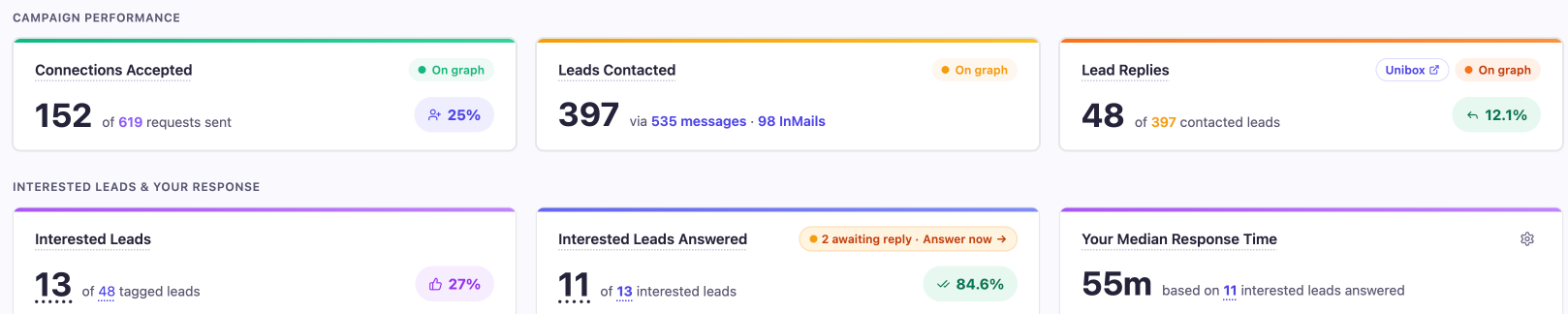
Yes, Claude can help with LinkedIn outreach. We used Claude in Chrome to review our LinkedIn outreach in OutFlo, the LinkedIn outreach tool we use. In one pass it read 9 campaigns across 2 LinkedIn accounts, found our best cold campaign (30% of requests accepted and 14.3% of people messaged replied, against 25% and 12.1% overall) and saved screenshots with no prospect details in them.
What did Claude do in OutFlo?
We asked Claude to review our outreach and find the strongest results. It worked in our own Chrome window, where OutFlo was already signed in. It:
- Read the all-time dashboard across both LinkedIn accounts: 152 of 619 connection requests accepted (25%), and 48 replies from 397 people messaged (12.1%).
- Compared all 9 campaigns on acceptance and reply rate, and flagged the ones that started on 12 and 13 October as too new to judge.
- Opened the best cold campaign and read its numbers and its sequence step by step.
- Kept the inbox and the interested-leads list out of every screenshot, so no real names or messages left OutFlo.
- Saved cropped screenshots of the dashboard and the best campaign.
Can one OutFlo workspace run several LinkedIn accounts?
Yes. We run two, one for each of two people, from one workspace. Each account runs its own campaigns, and OutFlo shows the results for each, which is how Claude could compare them side by side.
Account 1 ran 4 campaigns and sent 411 connection requests: 28.0% were accepted and 10.3% of the people messaged replied. Account 2 ran 5 campaigns and sent 208 requests: 17.8% were accepted and 13.1% replied. Figures from OutFlo on 17 October 2026.
One account gets more requests accepted; the other gets more replies once people are connected. That's the kind of difference that's easy to miss without per-account numbers.
All replies from both accounts land in one inbox. OutFlo prices its multi-account campaigns per LinkedIn account on Growth, with Booster covering 25 accounts and Scale described as "unlimited accounts, fair use up to 300".

What should you do with what Claude finds?
- A campaign started this week on 0% replies: too early to judge. Let it run.
- One account gets more requests accepted, the other more replies: compare the two profiles and the two first messages.
- Interested replies waiting for an answer: answer those before anything else.
- A clear best campaign: read its sequence step by step before changing the others.
Why does OutFlo work well with Claude?
Claude can only review what a tool shows clearly, and OutFlo lays it out well:
- Every campaign on one list, with acceptance and reply rates side by side.
- Each campaign's funnel on one screen: leads processed, connected, contacted, replied and interested.
- Numbers per LinkedIn account, as above.
- Sequences you can read like a flowchart, with each step's conditions written out, such as "If Connected" and "Wait 1 day after connection request accepted, and no reply from lead".
- Interested replies tagged by OutFlo's AI, so the leads that matter are easy to find.
OutFlo's Growth plan is $49 per LinkedIn account a month on monthly billing, as a year-end offer (normally $59), and less on quarterly or yearly billing. Prices as of 19 October 2026; check OutFlo's pricing page for current plans.
Should you use Claude in Chrome or OutFlo's MCP?
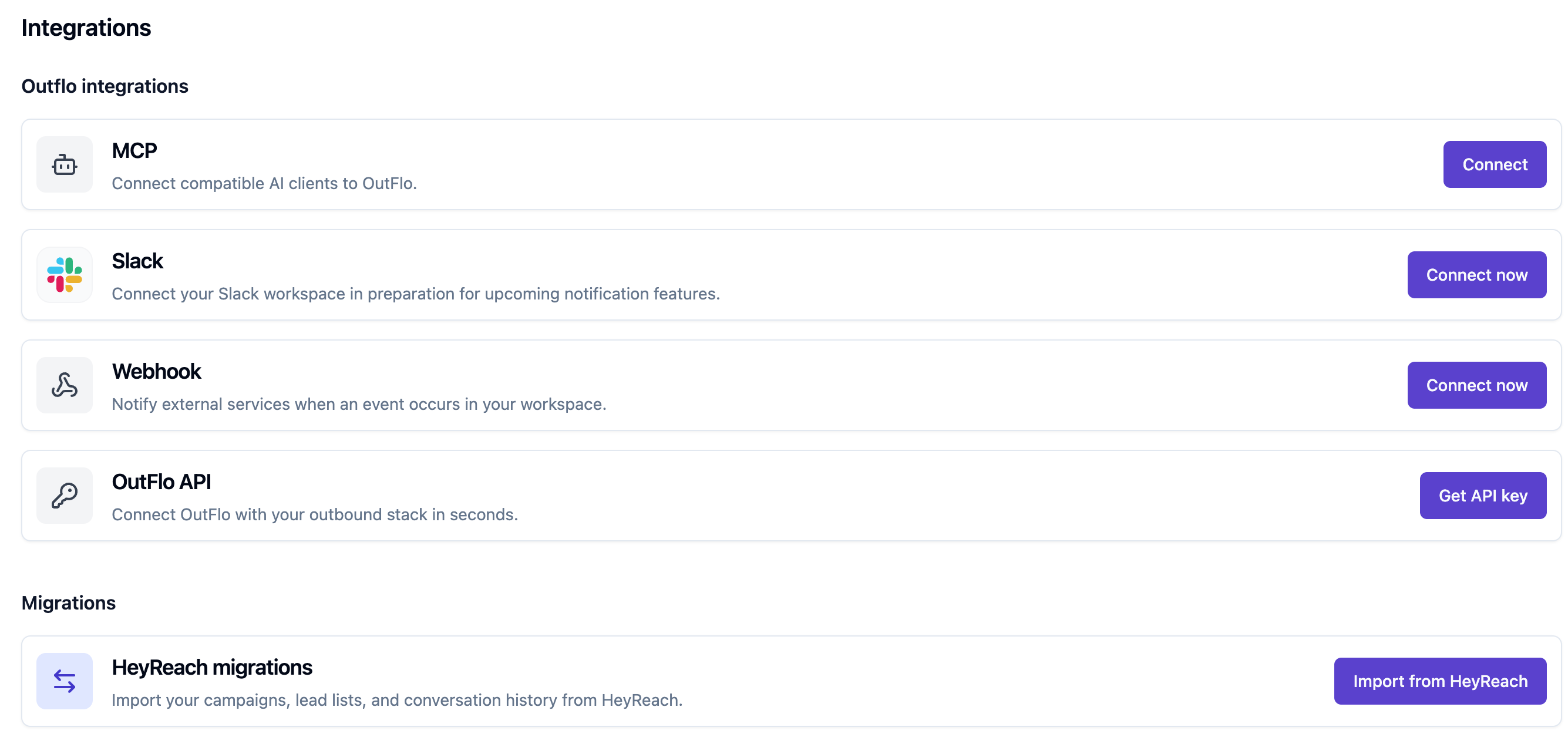
OutFlo also connects to AI assistants directly, through OutFlo's MCP for Claude. MCP (Model Context Protocol) is the standard way AI assistants connect to other software; in Claude, you add it as a connector. We use the same standard for our own Google Ads management inside Claude. The two routes suit different jobs.
Claude in Chrome works in your browser, on the OutFlo screens you already use. You install the extension, allow it on OutFlo and stay signed in yourself. It suits reviewing campaigns and taking screenshots, which is what we used it for.
OutFlo's MCP connects Claude or ChatGPT to your OutFlo workspace directly. You connect it from OutFlo's Integrations page, then add it in Claude (OutFlo's setup guide). OutFlo describes it as a way to manage campaigns, work through replies and check results from a conversation. We haven't tried it yet.
Recap
- Claude in Chrome reviewed 9 campaigns across 2 LinkedIn accounts in one pass, without exposing any prospect.
- Best cold campaign: 30% accepted, 14.3% replied. Overall: 25% and 12.1%.
- OutFlo's per-account numbers made the two accounts easy to compare. Its MCP is the direct route, which we haven't tried yet.
Common questions
Can Claude do LinkedIn outreach?
- It can help. We used Claude to review and report. The sending runs on OutFlo's own sequences, which already handle the timing, the conditions and both accounts.
Is it safe to let Claude into my outreach tool?
- Claude in Chrome works in your own browser, only on sites you allow. It doesn't enter passwords, so you sign in yourself. We also asked it to keep prospects' details out of every screenshot.
Does OutFlo work with ChatGPT?
- OutFlo says its MCP connection works with Claude and ChatGPT.

Tom Claydon
Co-founder of Nudge
Ask Tom anything about search, he answers on WhatsApp.